Clear a filled shape in straight parallel passes instead of spiralling in from the middle, so the bit can run with the wood grain and leave a cleaner surface.
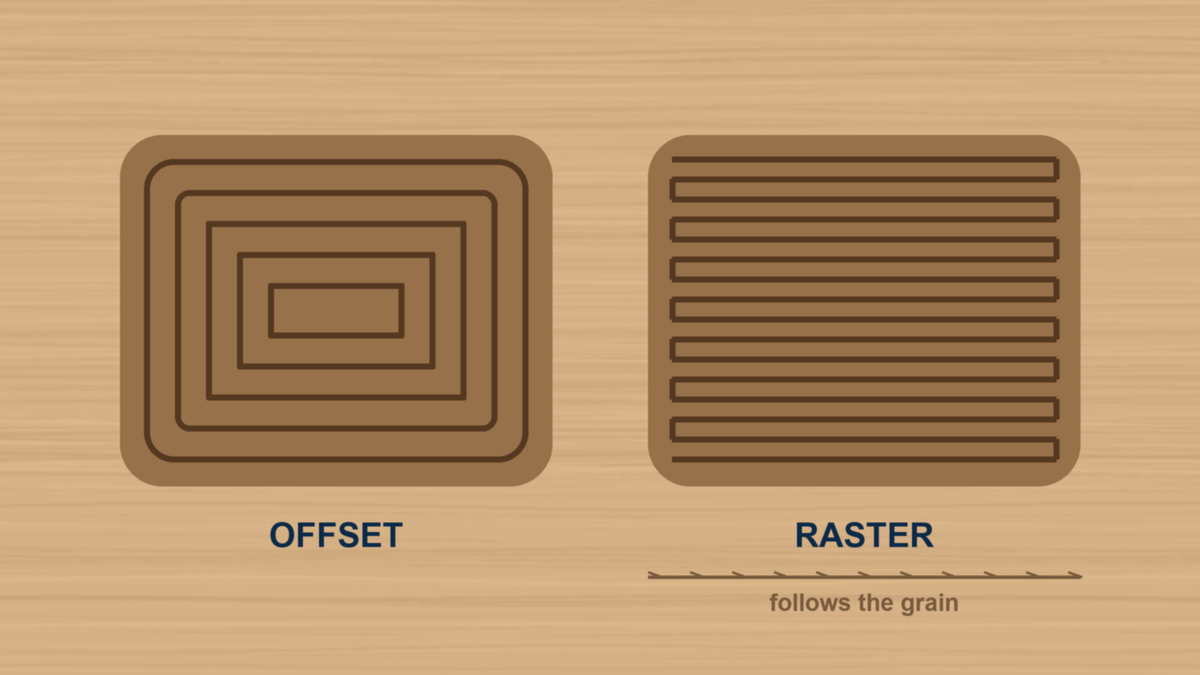
By default Easel clears a filled shape with an offset toolpath. The bit starts near the middle and works outward in loops that follow the contour of the shape. It is efficient, and for a lot of work it is exactly right.
A raster toolpath clears the same shape a different way. The bit sweeps back and forth in straight parallel lines across the area, all running in one direction, which you choose along X or Y.
That direction is the whole point. Wood cuts differently along the grain than across it, and an offset path is doing both on every loop, which is where swirl marks and fuzzy patches come from. Line the raster passes up with the grain and the surface comes out noticeably cleaner, with less sanding afterward. It is also what you want for flattening a board or surfacing a spoilboard, where a wide flat bit running in straight passes is the whole job.
Create a free Easel account today, or start a free trial to unlock every Starter and Pro feature.
Easel Pro Trial →
